This is a stand-in documentation in my personal blog before we transfer over in the more long-term documentation website. This will be updated as long as this will explicitly say it is in “archive mode” so to speak.
So you have been elected for, chosen to or forced upon you to start maintaining the whole server as a sysadmin, sysadmin aide or just person interested in how our system operations work in our humble radio club - this is a walkthrough guide how to understand what is going on and what it does consist of, not exactly a maintenance guide right now. The idea is to introduce people outside of the homelabbing and system administration field to understand a bit more how things work. Also, to have a reference for knowledge people as well to understand what to assume with this system.
Architecture
General Hardware Summary
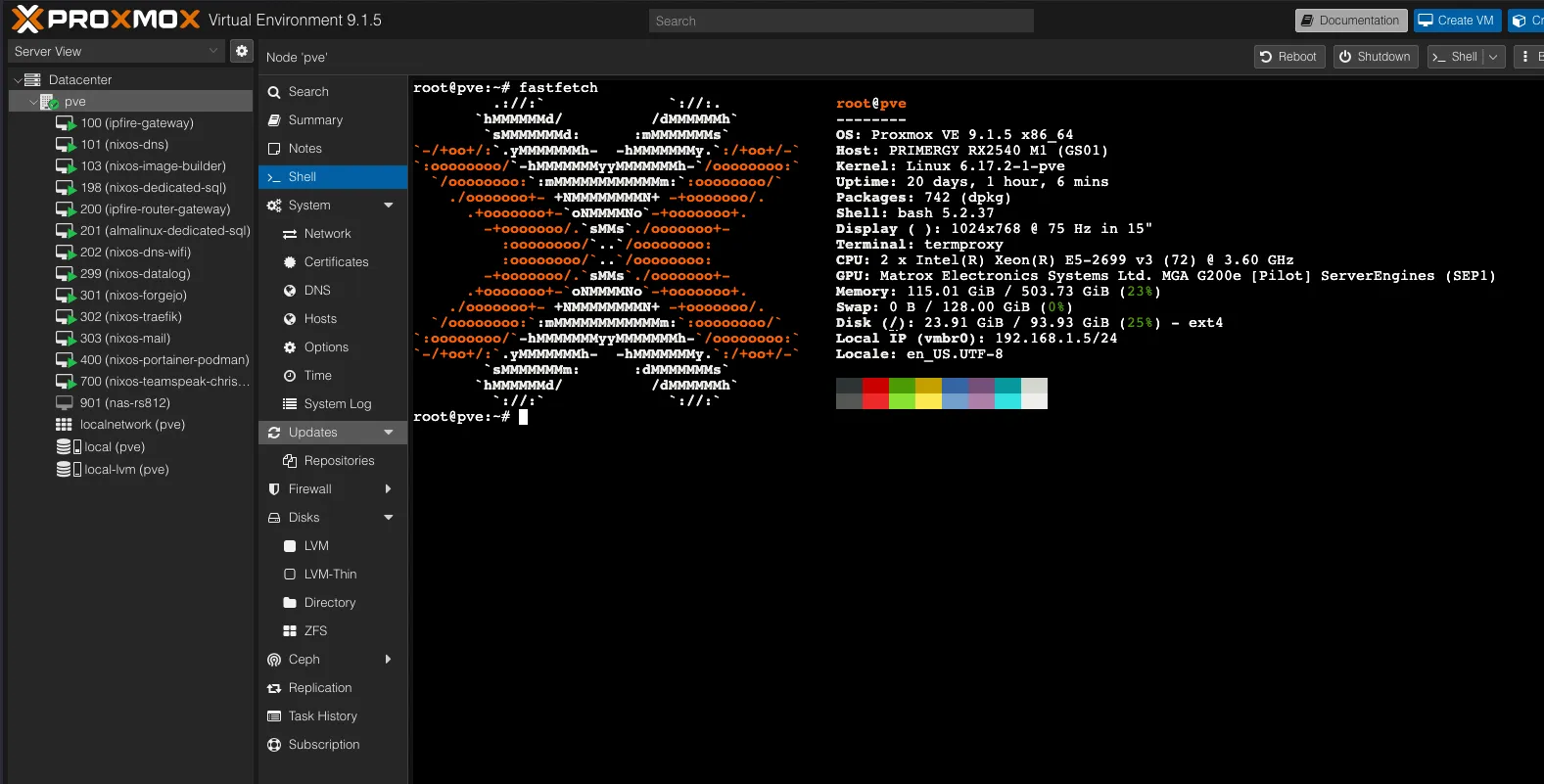
Here is the following fastfetch output of the current main Proxmox system.
root@pve
--------
OS: Proxmox VE 9.1.5 x86_64
Host: PRIMERGY RX2540 M1 (GS01)
Kernel: Linux 6.17.2-1-pve
Uptime: 19 days, 23 hours, 45 mins
Packages: 742 (dpkg)
Shell: bash 5.2.37
Display ( ): 1024x768 @ 75 Hz in 15"
Terminal: termproxy
CPU: 2 x Intel(R) Xeon(R) E5-2699 v3 (72) @ 3.60 GHz
GPU: Matrox Electronics Systems Ltd. MGA G200e [Pilot] ServerEngines (SEP1)
Memory: 114.97 GiB / 503.73 GiB (23%)
Swap: 0 B / 128.00 GiB (0%)
Locale: en_US.UTF-8
Disk Configuration
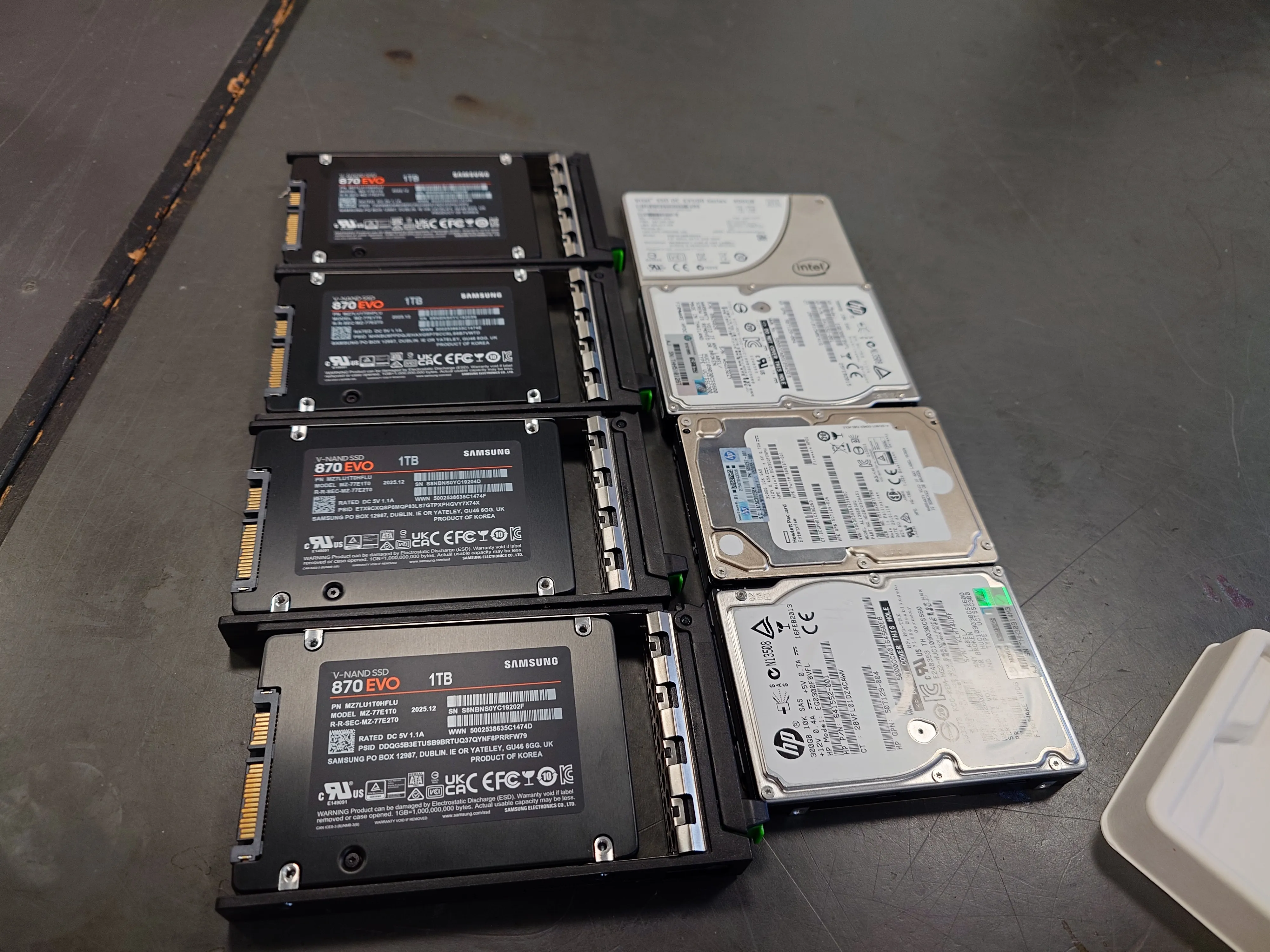
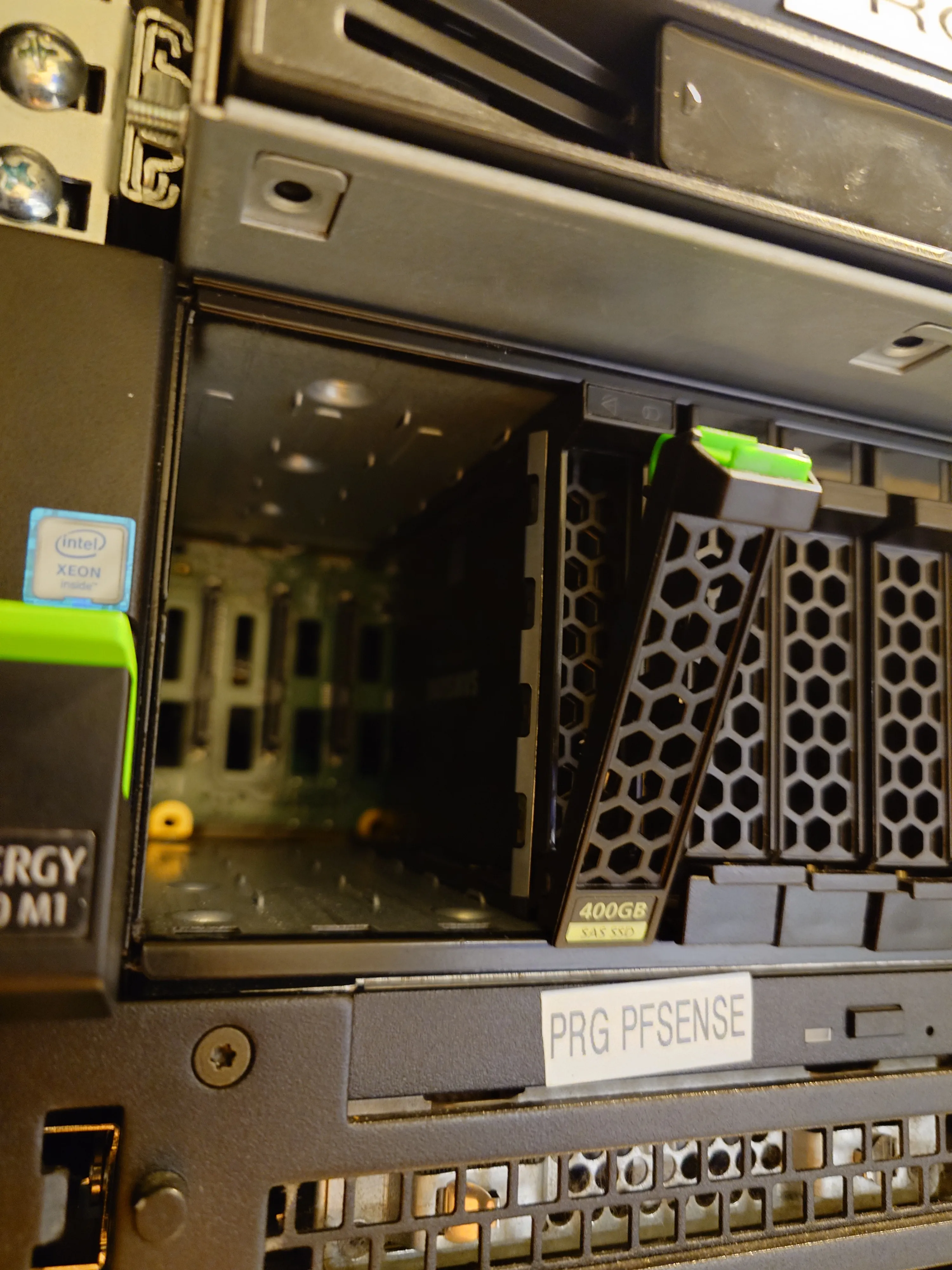
The following drives are configured in 4 x 1TB SSDs in RAID-10, upgraded from 330GB hard drives. The RAID configuration enables some read and write speed benefits like in RAID-0, but trading some of this with having some redundancy where this system is runnable if and only if one drive fails.
For the future, when the hard drive prices drop down a little, there is a room for some hot swapping capabilities, where we can have extra space for failures when these systems need more guarantees in uptime.
As per following images, as of 2026-02-18 - it using Samsung 870 EVO 1TB hard drives, which were bought brand new from Elgiganten which means maximum warranty of 5 years or 600 TBs of writing.

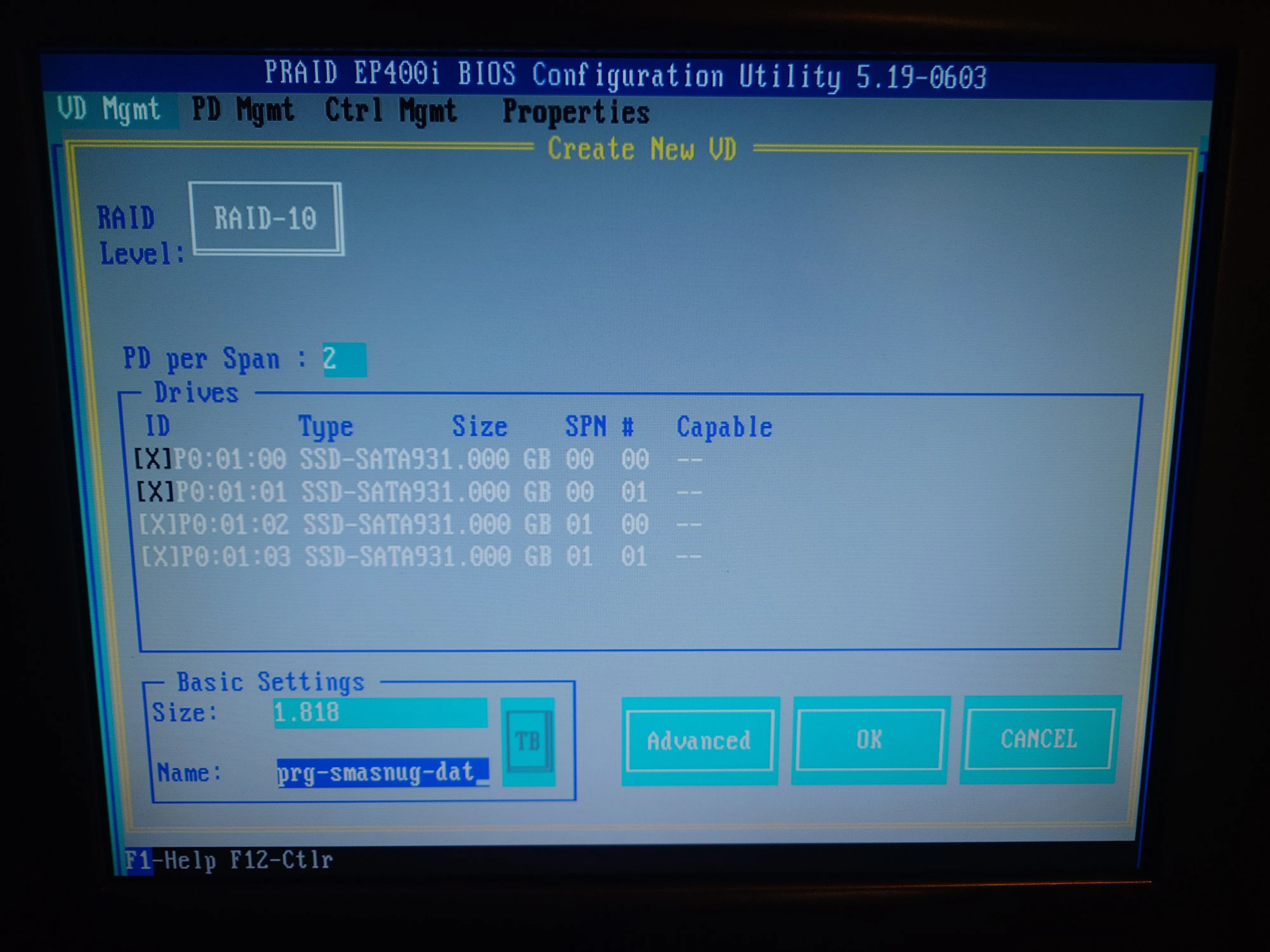
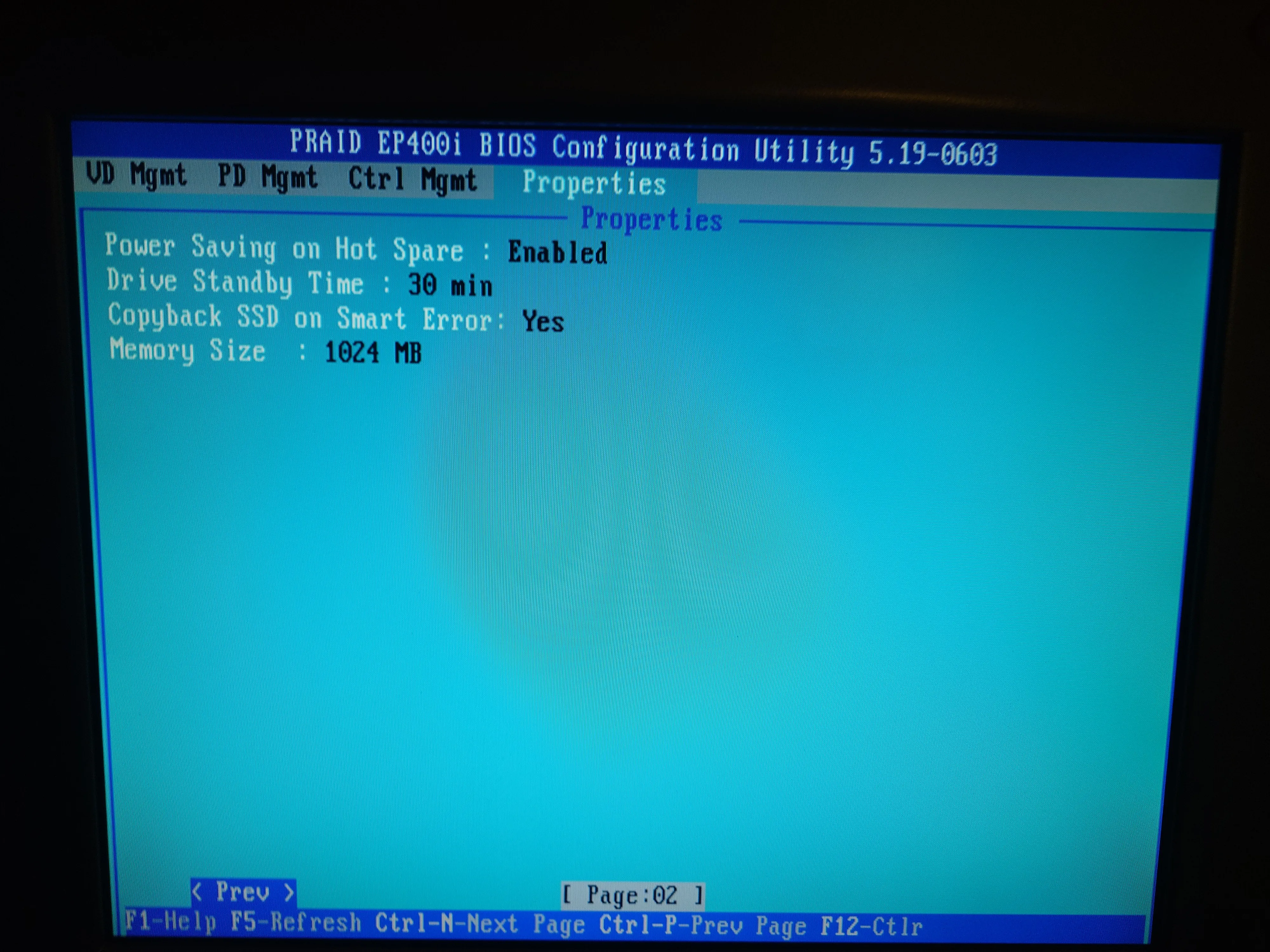
Here is the following configuration set from the RAID BIOS screen, which confirms we have setup the virtual hardware RAID-10 configuration, with the total size of 1.818TB and name of prg-smasnug-dat - yes, the typo is a deliberate.
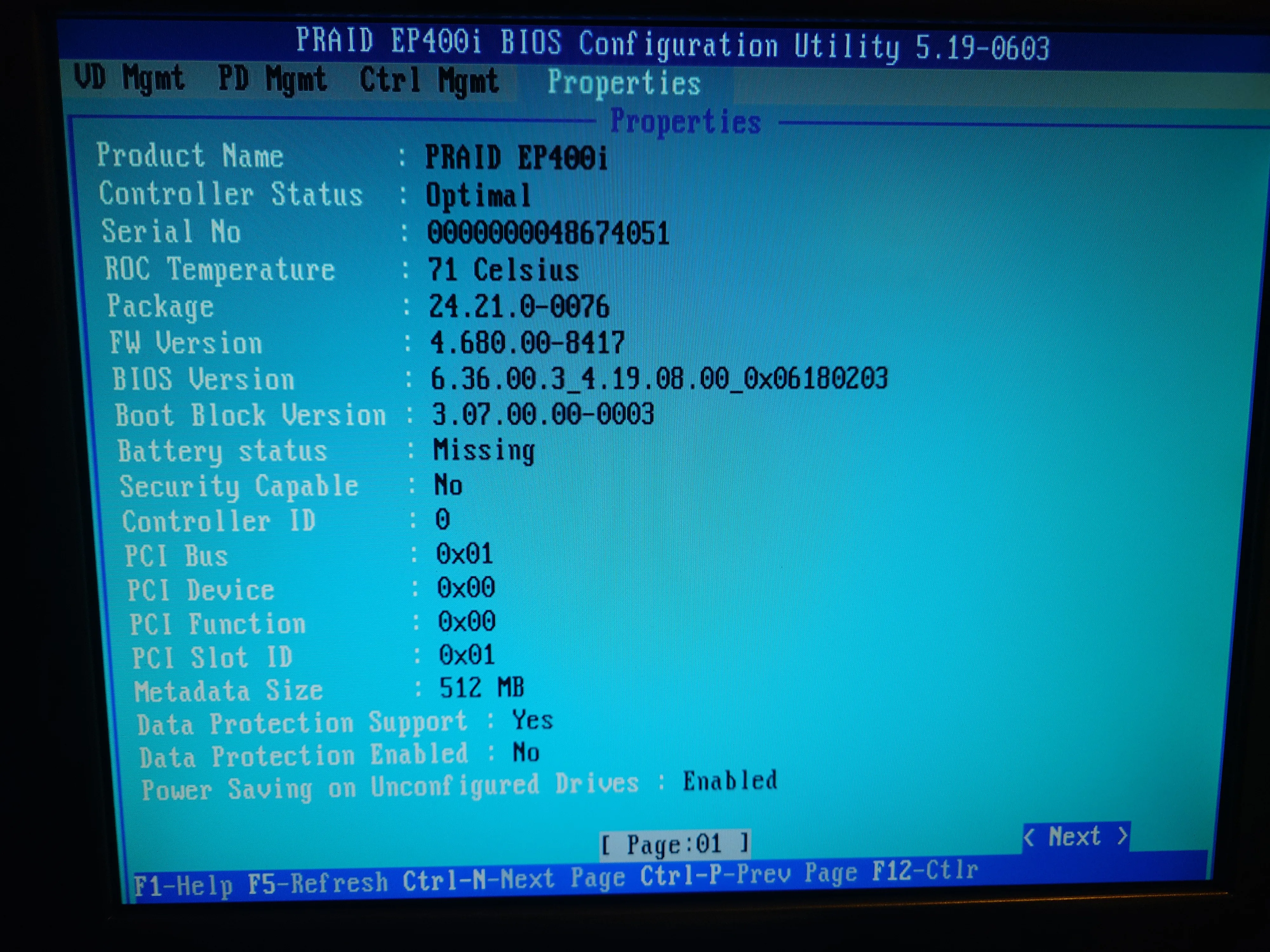
As you can see the current hardware RAID module has battery issues that need to be investigated before they grow into massive issues where we could lose some dirty volatile data not yet written into the RAID-10 virtual drive and thus into hard drives themselves as well, which could risk loss of data! This needs to be investigated and remedied long-term!
Operating System
Proxmox
We have opted to keep it stupid simple (KISS) for main machine, where we are using setup Community Edition of Proxmox, which is based on Debian distribution, which is based on Linux operating system. From that we have full suite of where to create virtual machines to provide systems for our needs (dedicated databases, web hosting, git codeforge, reverse proxy manager, Docker etc.). In basic terms, means that we are using this machine to create sub-machines to provide services to people in the club both inside and outside of the campus. Computer inside of a computer, so to speak.
Here is the following official Proxmox VE Administation Guide (click me!) to understand all nooks and crannies of details of how this operating system works and how exactly it should be maintained. There is also a good unofficial YouTube series by Learn Linux TV that does the same things as per written guide, but for there for people who prefer learning more about this from videos.
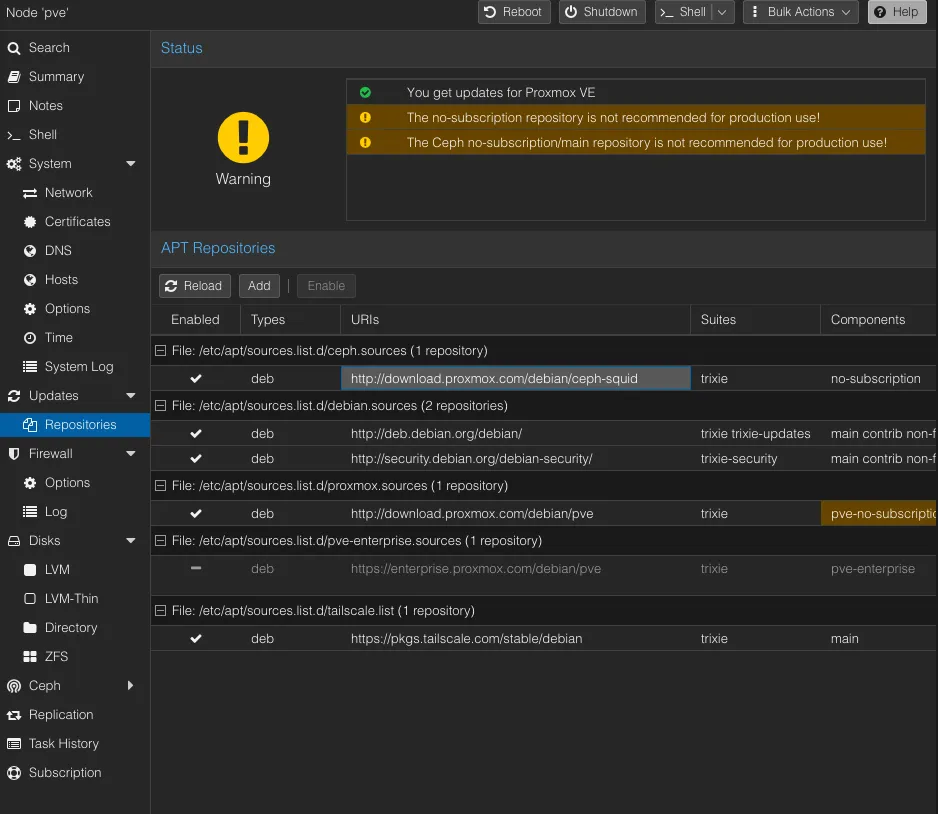
Here are the following repositories where our Proxmox distribution gets their packages from - which shows that we are not under corporate licence support, but we can still be on our own and be good with providing services.
The warning is superficial, as in its’ existence does not hamper the main function of the system, but it is there to remind that they cannot provide written guarantees of this software and thus no additional external support (outside of community forums) from Proxmox maintainers. Things might break and we need to report/ask from forums about this, and from there, contribute to the open source.
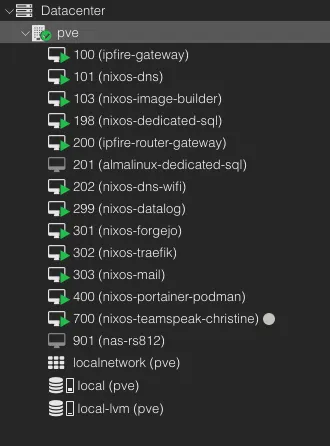
This is a tentative structuring, possibly converted over to the tag based system. Ranges that are not included are to be assumed as “free”.
The following Proxmox has the following general structure guide of the numbering system we have opted to use for our needs:
- 100-199 - For system critical virtual machines - such as firewalls, Dynamic Name Server (DNS), universal database inputs etc. These systems need to be always available for being able to use Proxmox VM and for other virtual machines to function properly.
- 200-299 - For sub-critical virtual machines - such as PRG club room’s WiFI DNS (which provides ad- and tracker-free network experience) and Grafana for whole system wide metrics and logs across the VMs and Proxmox itself. These systems can fail, but negatively impact the services in the club
- 300-499 - For hosting web services - Such as our self hosted Forgejo-based git codeforge, reverse proxy manager Traefik, mail server (
@prg.radio.org) and other services through the NixOS based Portainer-like Docker (i.e electronics inventory database and amateur radio logs) - 700-799 - For personal virtual machines - The following range is for people to temporarily “rent” out some space within the Proxmox machine to facilitate pre-production tests before deployment of services onto the virtual machine, or to provide services for their pilot project.
NixOS
We have decided to opt for NixOS over Red Hat Enterprise Linux based derivatives (such as Rocky and AlmaLinux) and Debian due to experiences with those systems before. We are aware that NixOS is less mature in the field of system in practice, but they have proven to be more long-term viable in fast iterative development of “develop fast, break fast, learn fast” mindset that many services and software has nowadays - which means that Debian and RHEL-based Linux systems are not long term sustainable to keep up with the changing configurations.
For people not aware of some current trends as the time of the writing in Linux distributions, NixOS is an linux distribution that essentially based on the in-house language Nix, which can be used to create entire system as a single configuration file of set values.
Imagine of having a pancake recipe - in usual case, you don’t or can’t follow the recipe to the letter like your favourite family (chosen or by blood) member did; you might have something different along the way, such as temperature of the water, specific milligramme of unknown spice etc. Same thing applies with usual Linux distributions, where two people might install the same program the same way, but there might be some minute details which create completely different behaviour, as in it might run on one machine, but not start up in another, hence why the expression of “it works on my machine!”. Nix, basically ensures that everything in recipe is essentially reproducible to near perfection of following the recipe. Where if you have written down the recipe in Nix on one machine, you can be sure it can run the same in another machine.
In case you have not noticed the keyword “near”, is due to inherent differences that two machines might still have, such as architecture (x86, ARM, RISC-V etc.), RAM speed, RAM size etc. But in essential cases, NixOS massively eliminates the divergence of setups between systems. Also some incredibly minute details with runtimes with some libraries. See a blog post from Arch Linux Developer from Morten Linderud about the valid critique about the correctness of term of “reproducibility”
Outside of the benefit of reproducible builds, we can reuse some of the configurations to have shared similar toolsets between different virtual machines, and pre-assign the network configuration between, which means:
- Two-Factor Redundancy - so we can have actual double backups of the virtual machine and the configuration itself, when we backup systems. So if we lose all ofthe virtual machine’s backups somehow, then as long we have a configuration, we can regenerate from it. Also same case if somehow the configuration file gets lost, because we can fetch it from the NixOS itself as well. Imagine 2FA, but for backups.
- Followable Scaling - We can formulate the configuration in a way that each virtual machine could have parametric configuration, where for our case, Grafana virtual machine grows along with the amount of virtual machines attached to it, which means that Grafana needs not to be setup manually every time when new virtual machine is created with Promethus and Loki, as it would “automatically” attach to it, as Grafana is built in reproducible manner. Imagine a layered cake frosting automatically being able to calculate exact same consistency to filler the each different taste layer of the cake.
To have beginner understanding of how NixOS works under the hood and how one could learn on their own, the following written guide “NixOS & Flake Book” and videos made by Vimjoyer and Ampersand as supplementary guides.
I strongly suggest against thinking about Flakes at first go when learning about NixOS, because the following configuration might have a too high of a learning curve that makes the learning experience with NixOS frustrating experience without knowing the fundamentals, the base Nix configuration is often times more than enough for most needs. Keep Flakes as back of your mind and find specific use cases for them, such as creating specific development environments, but don’t make them the foundation of the NixOS system when learning at first.
You can even try out Nix already in your MacOS, Windows Subsystem Linux, Arch, Ubuntu, RHEL etc. ! You can install the “vanilla” Nix by following the guide specific of your system, which might be advanced for beginners, by following this Nix reference manual. Also, you can have an install script medium that does the following guide for you, by using the Nix derivative Lix, by following their guide in their site.
Networking
This network architecture is also currently tentative and will be further expanded and explained upon initial completion of server services - as in, being able to be left alone long term, very easy to maintain and diagnose issues outside of the club vicinities securely and to leave it to future system administrators handling the systems.
Network Implementation as of 2026-02-18
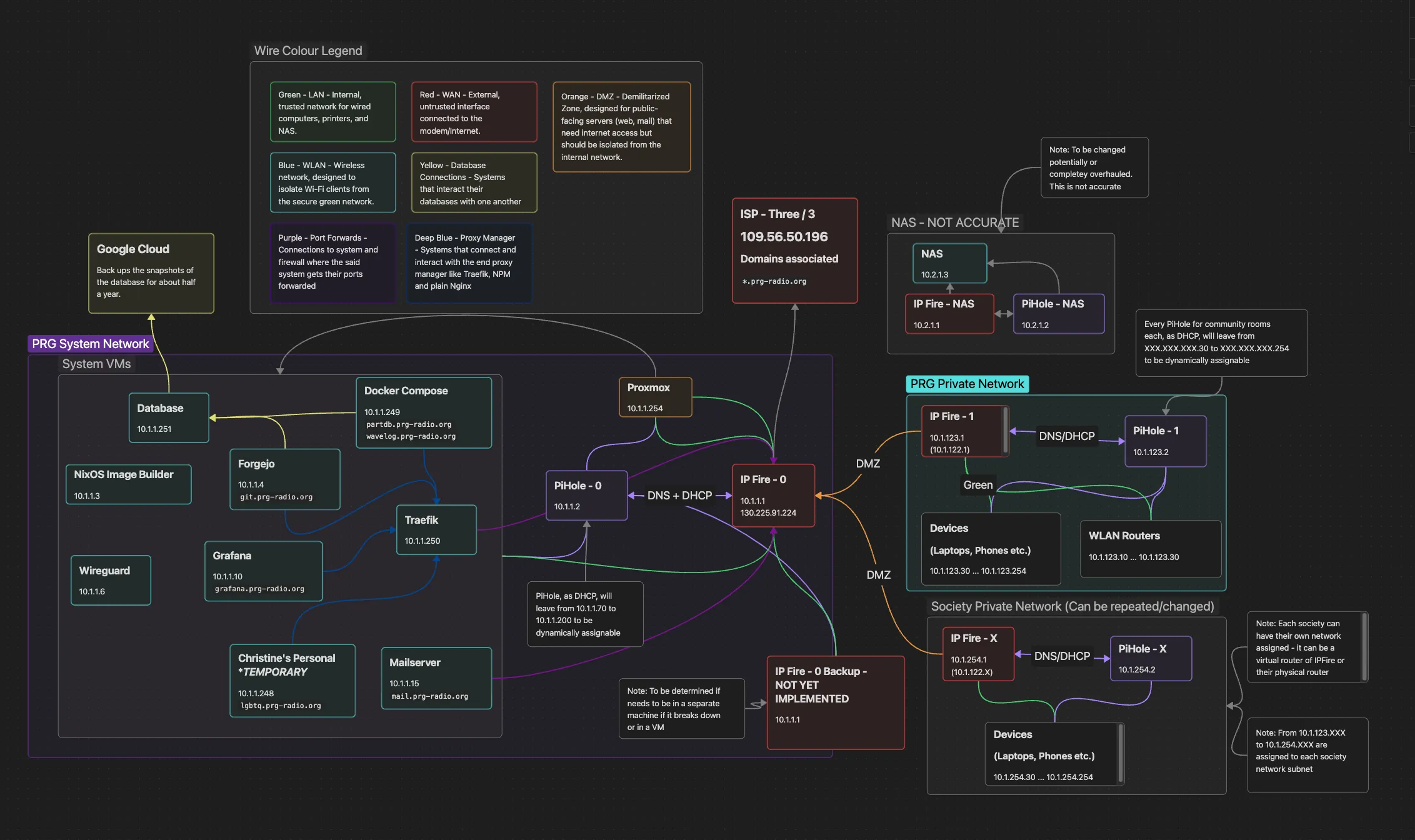
The general idea is to create a server hosting capabilities, where we can behave as an intranet between our systems within our network, but also ensuring security within our systems, hence the need of multiple firewalls. We are designating the initial firewall as the firewall that provides management and security between the Wide Area Network (WAN) / Internet and other local services in the local network - thusly, the other subnets is designated as filtered-but-open de-militarised zone (DMZ), with their own given firewalls. This enables for us to provide space for each different club in the Polyteknisk Forenings network or other bigger projects between club members.
Reverse Proxy Manager
The reverse proxy manager is managed by using Traefik, this was chosen due to potentially needing load balancing long term for our club as well, and not just a proxy manager - configuration of which is also managed as Nix configuration over Docker Compose file, to ensure that system interacts with different also Nix, but also Docker based, images consistently.
For simpler terms, reverse proxy managers are a tool which enables the network to share the same public address of the machine in the internet to provide different services, such as in, our case our Git codeforge https://git.prg-radio.org/ and parts database https://partdb.prg-radio.org/en/, despite the web domains pointing the same machine end address of the same port of 80 or 443, HTTP or HTTPS respectively. We tell the proxy manager to send people to respective web services depending on the website domain they write, which our case is the dot prefixes of our main prg-radio.org domain.
Anubis
When you may have checked the our Forgejo Git codeforce or the electronics parts inventory database. - you may have been directed to some anthropomorphic jackal-looking fellow checking your “soul” before letting you into our web hosted services; that is Anubis, the middleware within our reverse proxy manager, which checks if you are a AI-scraper.
This service tries to use your web browser on your machine to compute values for each to compare and thus let you in depending if you were able to compute them - this is possible by humans or basic non-malignant scraper bots (like Google Search) with their browser. The system will trip if you are looking and running on software that AI-scrapers might use, thus giving an harder problem for computer to solve which AI-scrapers might see as way too much trouble than it is worth. See the following documentation of how it works under the hood.
The reason why we opted to use this was to ensure that our systems wouldn’t be accidentally under some denial of service attack from AI training scraper bots, which costs extra electricity for us and take way limited network traffic from other people that might actually need it.
PiHole
PiHole is our chosen DNS server with Unbound DNS resolver to ensure that our system does not have a leaky DNS and blocks trackers/advertisements network wide within our club networks. Our block list chosen for our networks is the Steven Blacks’ unified hosts with fake news, gambling, porn.
If you have a valid reasons to object some entries the block list, then please let our sysadmin and other members to know to add the proposed site onto the whitelist, but mind that we won’t whitelist things that goes against Polyteknisk Radiogruppe’s and Polyteknisk Forening’s Byelaws.
A DNS leak is bad because it might expose your browsing activities, specifically the websites you visit and hop over to our Internet Service Provider (ISP), which is Three/3 for our case at the moment, or maybe potentially third-party hackers tapping in, even while you are using a VPN or proxy within our network.
It might look a bit “out there” why we used PiHole for our DNS solutions, but we opted to this, because the Nix configuration for this DNS solution was complete, detailed and maintainable for our needs.
IPFire
We chose IPFire for our firewall needs, we thought about OPNsense and pfSense, but it won over due to benefits of being Linux-based, lightweight, gentler licensing and potentially not conflicting with other features, such as reverse proxy manager. As per our diagram, we are have a distributed multiple firewalls within our local network to be able to provide some freedom of other club members to also provide services in future agreements without taking away the space from systems within the same network. We might miss out on the opportunity to use Crowdsec, but as per IPFire maintainers, they already ship with actually open-source IP-block-list solution.